Disable Cloudflare AI-Bot Block and Let GEO-Targeted Traffic Flow

Updated May 2026
TL;DR: Cloudflare's AI bot blocking can accidentally block GEO-targeted traffic from AI answer engines. Here's how to configure your rules so you stop the scrapers without losing the citations.
("GEO traffic" here = Generative-Engine-Optimised traffic from AI assistants like ChatGPT, Claude, Perplexity, and Gemini.)
I discovered this when our own traffic dropped. In July 2025, I noticed something weird in our SEOJuice analytics: brand mentions in AI answers had flatlined for about two weeks, even though our content output hadn't changed. I spent the better part of a Friday afternoon digging through server logs before I thought to check Cloudflare. There it was: "Block AI Scrapers" toggled on. (I'd had two coffees and was halfway through drafting a totally unrelated post when the penny dropped.) I don't remember enabling it. It might have been a default change during a Cloudflare plan upgrade, or one of our engineers flipped it during a DDoS scare and forgot to turn it back off. Either way, GPTBot, ClaudeBot, PerplexityBot, Google-Extended: all getting 403'd at the edge for two weeks straight. Our origin logs showed nothing because the requests never made it past Cloudflare.
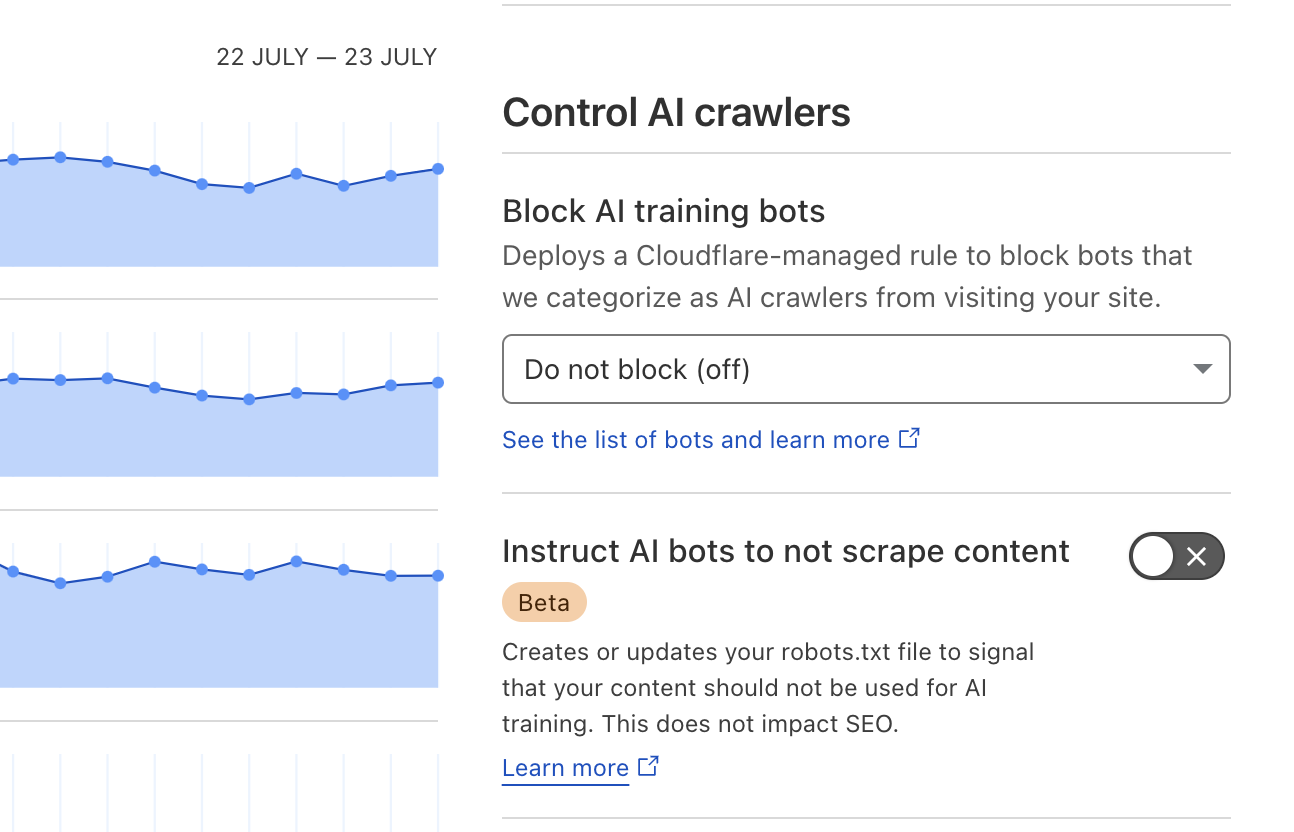
The context for the toggle: in July 2025, Cloudflare rolled out what it called "AIndependence", a one-click default-on block of AI scrapers, with Matthew Prince framing it as protecting creators from "AI bots that scrape content without permission or compensation." The SEO community split on it almost immediately: publishers who hate scraping cheered, while folks doing AI-search optimization (myself included) realized our citation pipelines had just been quietly severed. Pravin Kumar wrote up a Webflow-specific version of the same discovery a few months later; this is the version with a recovery timeline attached.
When Cloudflare serves a 403, ChatGPT falls back to whatever it can index elsewhere: product-hunt blurbs, out-of-date reviews, or competitor write-ups. You lose control of the narrative, and (more painfully) the link that would have driven qualified visitors straight to your site.
After I flipped the toggle off and added an explicit allow rule, our AI citations recovered within about 72 hours (measured against the previous 14-day baseline: ChatGPT-referrer sessions in GA4, filtered to chatgpt.com and perplexity.ai source/medium). Two weeks of invisible damage, fixed in two minutes. This article is that two-minute fix.
What "GEO Traffic" Really Means
Generative-Engine-Optimised (GEO) traffic is the stream of visitors that arrive after your content is cited inside AI assistants: ChatGPT "Browse," Gemini snapshots, Perplexity answers, Microsoft Copilot sidebars, even smart-speaker responses. When GPTBot or ClaudeBot crawls a page, the text and links flow into a vector store that powers these answers. Each time the model surfaces your paragraph with a live link, a percentage of users click through.
Why this matters: in our own SEOJuice crawler logs across the ~600 customer sites we monitor, reputable AI user-agents (GPTBot, ClaudeBot, PerplexityBot, Google-Extended, Bytespider) generated roughly 20-30% of the request volume that classic Googlebot did over Q1 2026. That's our data, not an industry study, and it skews toward SaaS and tech content where we're concentrated. Cloudflare Radar publishes its own bot-traffic share if you want a second source; their numbers run lower because they aggregate across all verticals, including ones AI bots ignore. The slice is growing maybe a few percent per month on our sample. I'm honestly not sure these growth rates will hold; they could plateau, they could accelerate. What I can say is that ignoring this traffic source right now means ignoring something that's already measurable on most tech sites.
Typical citation path:
GPTBot fetches your show-note or blog page,
Text is embedded and stored,
A user asks a question,
The model retrieves your snippet, cites the URL,
User clicks. You gain a high-intent visitor.
Block step 1 and the chain never starts.
How Cloudflare Accidentally Chokes AI Discovery
Cloudflare's Bot Fight Mode ships with an innocuous-sounding toggle: "Block AI Scrapers." Once enabled, any request matching GPTBot, ClaudeBot, PerplexityBot, or Google-Extended gets challenged or outright 403'd. Because the block happens at the edge, your origin logs may never record it; only Cloudflare analytics show a spike of 4xx responses to AI user-agents.
Why the toggle exists: Cloudflare is piloting a pay-per-crawl marketplace in which large LLM vendors purchase access tokens, and Cloudflare reportedly takes a meaningful platform cut, similar in spirit to App Store fees (the exact split hasn't been publicly disclosed, so treat any specific number you see floating around as rumor; Cloudflare's own announcement is intentionally vague on economics). Great for their margins; painful for content sites that rely on AI citations. (I understand their business rationale. I just wish the default weren't "block everything." This is my reading, not a Cloudflare executive's, so take it as one view.)
Symptoms you'll see
| Symptom | Where to Spot It | What It Means |
|---|---|---|
| Spike of 403s for GPTBot in Cloudflare logs | Security ▸ Events | AI bots blocked at edge |
| ChatGPT Browse cites 3rd-party summaries instead of your domain | Manual prompt test | Model couldn't crawl your content |
| Perplexity "Sources" list omits you despite topical relevance | Perplexity answer panel | Index missed your page |
Technical proof
curl -I https://seojuice.com/ --user-agent "Mozilla/5.0 AppleWebKit/537.36 (KHTML, like Gecko); compatible; GPTBot/1.0" HTTP/2 403
Run the same curl with a normal browser UA; you'll get 200 OK. The difference is Cloudflare's AI-bot block.
Bottom line: leave the toggle on and you're effectively setting Disallow: / for every major AI crawler. Flip it off, or create an explicit Allow rule for reputable user-agents, and GEO traffic can start flowing within 24-48 hours.
AI Crawlers You Do Want Inside the Gate
Of the five below, GPTBot is the one I'd unblock first if you only had time for one (volume), ClaudeBot is the one I underestimated until our citations on technical posts started showing up on Anthropic's side, and Google-Extended is the quietest but probably the one with the longest tail. Here's the full list:
| Bot | Vendor | Why You Want It | Official User-Agent String* |
|---|---|---|---|
| GPTBot | OpenAI | Feeds ChatGPT answers and link citations. Official docs. | Mozilla/5.0 … GPTBot/1.0 |
| ClaudeBot | Anthropic | Powers Claude AI citations and real-time fetches. | Mozilla/5.0 … ClaudeBot/1.0 |
| PerplexityBot | Perplexity.ai | Builds Perplexity's answer index (sources panel drives clicks). | Mozilla/5.0 … PerplexityBot/1.0 |
| Google-Extended | Supplies the Gemini LLM; separate from classic Googlebot. | Mozilla/5.0 (compatible; Google-Extended/1.0…) |
|
| BingBot (Copilot) | Microsoft | Crawls for both Bing search and Copilot AI responses. | Mozilla/5.0 … bingbot/2.0 |
*Ellipses (…) indicate standard browser strings preceding the bot token.
Step-by-Step: Disable Cloudflare's AI-Bot Blocking
-
Log in to Cloudflare Dashboard
Choose the domain you want to fix. -
Navigate:
Security ▸ Bots -
Locate "Block AI Scrapers" Toggle
It sits under Bot Fight Mode. Turn it OFF. -
(Optional but safer) Add an Explicit Allow Rule
Security ▸ WAF ▸ Custom Rules ▸ CreateExpression:
(http.user_agent contains "GPTBot") or (http.user_agent contains "ClaudeBot") or (http.user_agent contains "PerplexityBot") or (http.user_agent contains "Google-Extended") or (http.user_agent contains "bingbot")Action: Skip → Bot Fight Mode, Managed Challenge
-
Purge Cache
Caching ▸ Configuration ▸ Purge Everythingso bots fetch fresh 200 responses. -
Verify
curl -I https://seojuice.com/ \ -A "Mozilla/5.0 AppleWebKit/537.36; compatible; GPTBot/1.0"Expect
HTTP/2 200, not403.
Total time: ~2 minutes. Result: AI crawlers can finally read and cite your pages.
Robots.txt for an AI-First SEO Posture
Earlier I said the toggle is the whole story. That's about 90% true. The other 10% is your robots.txt, because a stale Disallow line will silently undo everything you just did at the Cloudflare layer.
User-agent: * Allow: /
That's it. A blanket allow ensures all reputable bots, search and AI alike, can access every public URL. Partial or legacy Disallow: lines break modern indexation because:
AI bots often lack special rules for sub-directories; a stray
Disallow: /apican cascade into full denial.Future crawlers inherit the same rules; your "temporary" block becomes permanent training data exclusion.
If you must throttle bandwidth, use Cloudflare rate-limiting or WAF, not robots.txt, so you maintain crawl visibility while controlling load.
FAQ: Cloudflare, AI Bots, and Blocking
Q 1. Cloudflare's "Bot Fight Mode" is on, but I don't see any errors in my server logs. Why?
Cloudflare blocks GPTBot and friends at the edge, so the 403 responses never reach your origin. Check Cloudflare Dashboard → Security → Events or run a curl test with the bot's user-agent; that's where the hidden blocks surface.
Q 2. Will allowing GPTBot spike my bandwidth bill?
A full GPTBot crawl is lightweight: HTML only, no images, no CSS, no JS execution. For a 500-page site it's typically < 30 MB per month, far below the 100 MB Cloudflare free-tier egress allowance.
Q 3. Could unblocking AI crawlers expose private or paid content?
Only if the URLs are publicly reachable. Keep premium PDFs or member videos behind authentication headers; GPTBot obeys HTTP 401/403 just like Googlebot. Robots.txt is not a security feature: if a URL is reachable, robots directives are a polite suggestion, not a gate.
Q 4. Does Cloudflare's "Verified Bot" list include AI crawlers?
No. GPTBot, ClaudeBot, and PerplexityBot are not on Cloudflare's verified list yet, so they fall into the generic "AI Scraper" bucket that gets blocked when the toggle is on.
Q 5. What about sketchy, bandwidth-draining AI scrapers?
Create a WAF rule to allow only reputable user agents (GPTBot, ClaudeBot, PerplexityBot, Google-Extended, bingbot) and rate-limit everything else. You stay open for citations but guard against unknown harvesters.
Q 6. If I unblock today, how fast will AI assistants start citing me?
I mentioned 72 hours up top. Here's where that number comes from: across our own most-cited pages, GA4 sessions tagged with chatgpt.com referrer returned to baseline in roughly 3 days after we flipped the toggle and purged cache. The long tail took closer to 10 days. (Honestly, I assumed it'd be a week minimum across the board. It wasn't.) Per OpenAI's GPTBot docs, recrawl frequency varies with page popularity and update signals, so your numbers will depend on how often your URLs were already being requested before the block.
Run this on your site
The fastest way to verify the fix actually took, on your domain: Run AI Crawler Inspector →
It probes your URL with each AI user-agent and tells you which ones are getting 200s versus 403s, before you wait three days to see whether ChatGPT picks you back up.
Keep reading
- AI Crawler Playbook 2025: full strategy for managing AI bot access.
- LLM.txt Generator: give AI crawlers a structured summary instead of blocking them.
Read More
no credit card required